
Important system requirements
General requirements

These requirements apply to all ReleaseEngine components unless otherwise specified.
Java Runtime Environment: JDK/JRE (Oracle, OpenJDK, Zulu, Corretto)
Web Server: WildFly
Database: MariaDB (Alternative: MySQL 8.1–9.4)
Preferred Operating System: Windows (required for processing based on Creo)
Network: At least 1 network card
Web Browser: Chrome, Edge, or Firefox (optional, for cockpit access)
Creo 10–12 (optional)
Supported operating systems
Windows: Windows 10/11, Windows Server 2016+
Linux:
Oracle Linux 8+
Ubuntu 22.04 LTS, 24.04 LTS, 25.10
Red Hat Enterprise Linux 7+
SUSE Linux Enterprise Server 15
Others upon request
Tested configurations
Windows 10, Windows 11, Windows Server 2016
Ubuntu 24.04 LTS
Java 21 (Oracle/OpenJDK)
WildFly 35
MariaDB 10.11
Creo 8, 10, 12
For more information, see Oracle JDK 21 Certified System Configurations.
ReleaseEngine Cockpit
Operating Systems: Windows, Linux
Runtime: WildFly, MariaDB, Java (JDK/JRE)
Web Browser: Chrome, Edge, Firefox (optional)
We recommend adhering to the following minimum hardware requirements:
Hardware | min. | Recommended |
|---|---|---|
CPU | 2 | >=4 |
RAM | 8GB | >=16GB |
HDD | 30GB | depending on usage (Vault, etc.) |
Network card | 1 | 1 |
ReleaseEngine Daemons
The actual RE processing is performed with daemons. The following requirements apply to these, depending on whether they access PTC Creo or not:
ReleaseEngine Daemons (without Creo)
Operating systems: Windows, Linux
Java/JRE (Oracle, openJDK, Zulu, Corretto, etc.)
We recommend adhering to the following minimum hardware requirements:
Hardware | min. | Recommended |
|---|---|---|
CPU | 2 | >=2 |
RAM | 8GB | >=16GB |
HDD | 30GB | depending on usage (Vault, etc.) |
Network card | 1 | 1 |
Additional license requirements
A Windchill base license for the user account under which the daemons run (if the RE accesses Windchill).
ReleaseEngine Daemons (with Creo)
Operating Systems: Windows only (as required by PTC Creo)
Java/JRE (Oracle, OpenJDK, Zulu, Corretto, etc.)
Creo with license
JLINK: required by the ReleaseEngine for communication with Creo
The supported operating system versions depend on the Creo version used
Creo-based installations require Windows. According to PTC, Linux is not supported for Creo, see Summary of Future Platform Support for Creo | PTC
A compatible Creo version must be used together with Windchill, see Overview of Creo and Windchill Product Version Compatibility

Ensure compatibility with Windchill
Additional License Requirements
A CREO Parametric license for each instance of the ReleaseEngine daemon (if the RE accesses CREO, e.g., to trigger a conversion).
A Windchill base license for the user account under which the daemons run (if the RE accesses Windchill).
Requirements
Must meet the PTC Creo hardware requirements for the selected version
Graphics Processor (GPU): According to PTC, GPU recommendations for Creo can generally be relaxed when used as a daemon (lower need for rendering and shading)
See for example Creo 7.0 Hardware Notes | PTC.

Example with Creo 7:
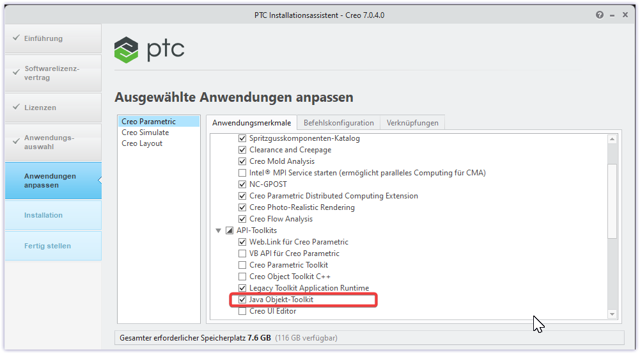
The file pfcasync.jar must be present after installation in the directory <Creo Dir>\Common Files\text\java.
Optional Software (depending on configuration)
Software | min. version | max. version | Vendor license required |
|---|---|---|---|
SAP GUI | upon request | ||
MS Office | 2010 | 2016 |
|
Open Office | upon request | upon request |

General hardware sizing
The sizing of the ReleaseEngine depends heavily on the scenario represented by the ReleaseEngine. Influencing factors include, for example, the size of the files, the number of installed parts, the complexity of the components, etc.
For detailed sizing, a precise understanding of the respective scenario is important and therefore requires preparatory project work.
INNOFACE is happy to assist you with this preparatory project work and is available upon request.
Daemons with access to SAP Systems
When the ReleaseEngine is used with SAP systems, you must observe the following requirements:
When using SAP ERP:
SAP BASIS >= 6.40
When using SAP S/4HANA (on-premises or cloud):
Version >= SAP S/4HANA 1610