
Jobs in process
The overview of ‘Jobs in Progress’ is located at the top of the dashboard. The currently processed jobs are listed in a configurable table.
Via the dropdown menu ‘Show Columns’ the table can be configured, i.e., columns can be added or removed.
By default, the columns Status, ID, Cluster, Object Description as well as Job Description are displayed.
Via the selection in ‘Show Columns’ the following columns can be added:
ID
Facility
Completion
State
Result
Object Description
Job Description
Cluster
External User
Finishing Comment
Action
Daemon
Host
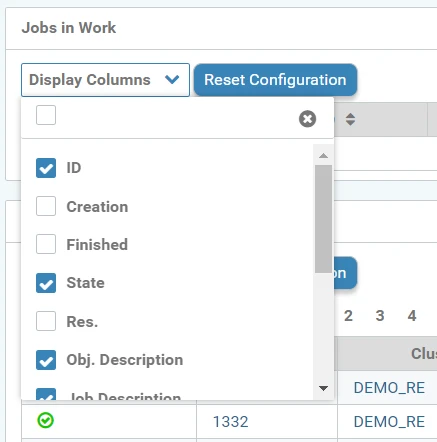
Column selection for table configuration
Via the top checkbox in the dropdown selection, all columns of the table can be displayed.
The cross at the top right of the dropdown selection closes it again.
The button 'Reset configuration' resets the table back to the default view.
With the arrow symbols behind the column names, the table can be sorted ascending or descending according to the column.
By clicking on the Job ID, you can jump to the detail page of the Jobs .
.webp?inst-v=c8e1b79e-541a-46b8-9fdd-f53796c11a4c)
Jobs in process